
AI invoice processing can reduce repetitive data entry by extracting information from invoices and receipts, applying agreed checks and preparing approved records for accounting software. The useful question is not whether a tool can read a PDF. It is whether the complete workflow preserves accurate records, exposes uncertainty and keeps financial authority with the right people.
This guide helps UK businesses evaluate invoice and receipt automation without treating extraction as approval. It covers intake, field capture, VAT checks, duplicate detection, human review, accounting handover, retention and acceptance testing. If you already know which invoice route creates the most manual work, compare it with Alchemist Media’s live AI invoice processing service and use the controls below to scope a focused first implementation.
What AI invoice processing should automate
A good workflow handles narrow, repeatable tasks. It can monitor an agreed inbox or upload route, recognise an invoice or receipt, extract selected fields, compare values with rules, identify likely duplicates and prepare a structured record. The live Alchemist Media offer supports email, PDF and photo intake, categorisation, duplicate detection, VAT validation, bulk approval and posting to Xero or QuickBooks.
Those capabilities do not remove the need for ownership. Extraction answers, “What does this document appear to say?” Validation asks whether the information is complete and internally consistent. Approval decides whether the business accepts the cost. Payment is a separate financial action. Keeping these stages separate makes errors easier to catch and responsibilities easier to audit.
Start by listing the decisions made today. Note who receives invoices, checks the supplier, confirms goods or services, approves the cost, resolves VAT questions, posts the record and schedules payment. Automation should support that policy, not quietly invent one.
Map the invoice route before choosing software
Invoice work often arrives through more routes than expected: a shared mailbox, personal email, PDF upload, scanned paper, supplier portal, phone photo or recurring statement. If several uncontrolled routes remain active, the business can miss invoices or process the same document twice even when extraction is accurate.
Draw one map from arrival to an approved accounting record. For each stage, record the input, output, owner, allowed system action and safe failure state. Decide which document types belong in scope and which must be rejected or reviewed. A receipt without supplier details, a credit note, a foreign-currency invoice and a purchase-order invoice may need different rules.
Choose one high-volume, low-ambiguity route for the pilot. A shared invoice mailbox with known suppliers is usually easier to control than every expense source at once. Broader opportunities can be compared on the AI automation solutions page, but the first deployment should have a clear boundary and a named owner.
Define extraction fields and evidence
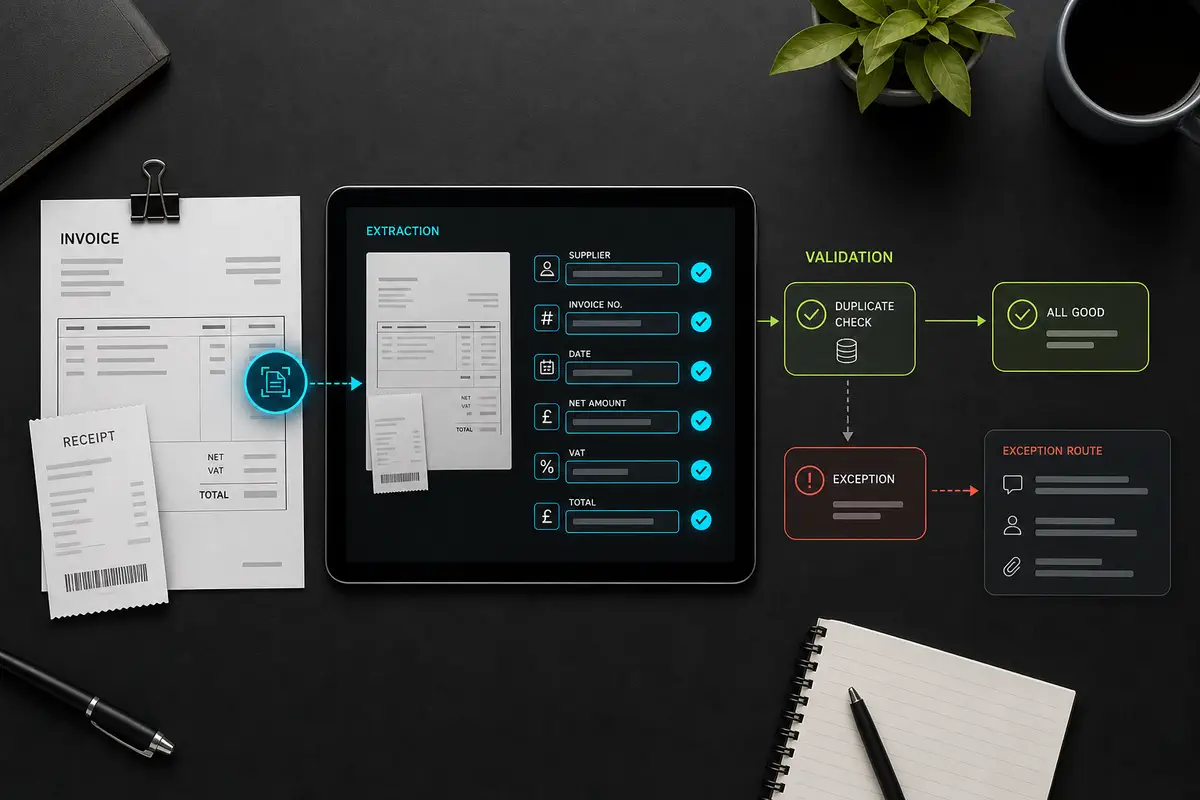
Do not ask the system to “read the invoice” as one vague task. Define the required fields and what counts as acceptable evidence. Common fields include supplier name, invoice number, invoice date, tax point where relevant, currency, purchase-order reference, line description, net amount, VAT rate, VAT amount, gross total and due date.
HMRC’s electronic invoicing guidance says electronic VAT invoices must contain the same required information as paper invoices. It also addresses authenticity of origin, integrity of content, legibility, access controls and an audit trail between invoicing and internal processing systems. That makes the original document and the structured record part of the evidence, not disposable input.
For every field, set a confidence threshold and fallback. A clear total may pass automatically, while an unreadable invoice number should enter an exception queue. Cross-check arithmetic: net amounts plus VAT should reconcile with the total, and line totals should match the document total within an agreed tolerance. Preserve the source location for each value so a reviewer can compare it quickly.
Validate suppliers, VAT and duplicates separately
Validation should use explicit rules rather than a single all-purpose score. Match the supplier against an approved record. Compare the invoice number and supplier combination with previous records. Check that the currency, totals and purchase-order references follow the policy for that supplier or department. Mark missing or contradictory fields with a reason code.
Duplicate detection needs more than an identical filename. Suppliers can resend the same invoice with a different attachment name, and scans can produce slightly different files. Compare stable fields such as supplier, invoice number, date and total, while allowing a reviewer to resolve legitimate repeats, revised invoices and credit notes.
VAT validation should flag issues for a qualified person rather than present tax judgement as certainty. Define which checks are simple format or arithmetic tests and which require finance review. Keep the rule version used for each record so later changes do not obscure how a decision was made.
Protect supplier bank-detail changes
A changed bank account must not pass merely because it appears on a convincing invoice or email. Treat new or amended payment details as a separate high-risk event. Pause processing, alert a named finance owner and verify the change through a trusted contact route already held by the business.
The National Cyber Security Centre’s board toolkit describes an invoice-fraud case in which email rules and altered bank details contributed to a fraudulent payment. The resulting controls included verifying new or updated supplier bank details by phone. The practical lesson is clear: an automated extraction result must never become its own proof of payment identity.
Log who performed the independent check, when it happened and which trusted contact method was used. Do not place full bank details in general workflow logs or notifications. Restrict access to the systems and people who need them.
Design a human approval and exception queue

Human review should be a designed part of the workflow, not an informal rescue when something fails. Create simple exception categories: missing required field, unreadable document, duplicate warning, unknown supplier, changed supplier details, purchase-order mismatch, tax question, unsupported currency or accounting integration failure.
Each exception needs an owner, evidence, permitted actions and a status. The reviewer should see the original document beside extracted values and highlighted differences. Corrections should be recorded rather than silently replacing the first result. Repeated corrections can then identify a weak template, unclear supplier instruction or extraction rule that needs improvement.
Bulk approval can be appropriate for genuinely routine records, but the batch should show what passed, which rules were applied and which items were excluded. Approval should be attributable to a person with the correct authority. Do not mix a clean batch with unresolved exceptions simply to clear a queue.
Control the accounting handover
Connecting to Xero, QuickBooks or another accounting platform is a data-write boundary. Define exactly which fields may be created or updated, which account or tax codes are allowed and whether the first phase creates a draft rather than a final record. Use a dedicated integration identity with the minimum permissions needed.
Make writes safe to retry. A timeout after posting must not create a second bill when the workflow runs again. Store a unique source identifier, check whether the record already exists and reconcile the response from the accounting system. If the integration is unavailable, keep the approved item in a visible retry state rather than marking it complete.
Separate accounting export from payment instruction. A posted invoice can still require the organisation’s existing approval and payment controls. This boundary reduces the risk that a data-extraction error or compromised document can trigger a financial action.
Set privacy, access and retention controls
Invoices can contain names, addresses, contact details and transaction information. The Information Commissioner’s Office’s data protection by design and by default guidance says organisations should consider privacy from the design stage, use only the personal information necessary for the purpose, limit access and define storage periods.
Document where source files, extracted fields, logs and backups are stored. Apply role-based access, encryption where appropriate and a retention schedule that reflects legal and operational requirements. HMRC’s electronic invoicing notice says businesses must normally keep issued and received invoices for six years, while specific circumstances may require advice. Confirm the rule that applies to your records rather than using a workflow default without review.
Decide what the AI provider and integration processors receive, whether data is used beyond the requested task, where it is processed and how deletion works. Keep secrets and credentials outside prompts, files and general logs.
Test AI invoice processing before rollout
Build an anonymised test set that represents normal work and difficult cases. Include clean PDFs, phone photos, multi-page invoices, credit notes, duplicated files, conflicting totals, missing VAT information, unfamiliar suppliers, changed bank details, handwriting, foreign currency and deliberately unreadable documents.
For each test, specify the expected fields, validation result, exception route and accounting outcome. Test failed dependencies too: revoke a non-production credential, simulate an accounting timeout and resend the same event. The workflow should pause safely, preserve evidence and recover without duplicate records.
Useful acceptance measures include field accuracy by field type, duplicate-detection precision, exception rate, reviewer correction rate, unresolved queue age and successful draft creation in the accounting sandbox. Agree thresholds before the pilot. A lower error rate for totals does not compensate for poor supplier matching or missed bank-detail changes.
Run the first phase in shadow mode or draft-only mode. Compare its proposed records with the current process, review failures and keep a documented rollback route. Expand to another supplier group or document type only after the owner accepts the results.
Scope the right first implementation
A useful discovery session should produce a process map, field dictionary, validation rules, exception policy, access model, test set and rollout boundary. Bring examples of common invoices, current approval limits, supplier-master rules and the accounting fields your team actually uses.
Review current module choices on the pricing page, then use the contact page to discuss one controlled route. The goal is not to automate every finance decision. It is to remove avoidable handling while keeping evidence, exceptions and authority visible.
Frequently asked questions
Can AI invoice processing post directly to accounting software?
It can prepare and post approved structured records when the integration and permissions support that action. A safer first phase creates drafts after validation and human approval. Payment authority should remain a separate control.
How should low-confidence invoice fields be handled?
Send them to a visible exception queue with the original document, extracted value, confidence or reason, and a named reviewer. Do not fill missing values by guesswork or silently discard the invoice.
What should be checked before connecting Xero or QuickBooks?
Confirm field mappings, supplier matching, tax and account-code rules, duplicate protection, minimum permissions, retry behaviour, audit logs and rollback. Test against a non-production or draft-only route before enabling wider writes.

Recent Comments